TL;DR
- Room echo happens when hard surfaces bounce sound back into your mic — fixing the space helps, but you can also remove echo sound from finished recordings in seconds with AI.
- AudioCleaner AI’s free echo remover lets you upload MP3, WAV, M4A, or video files, process online, and download cleaner audio with no install, no credit card, and no sign-up required.
- This guide covers how to eliminate echo in a room before you record, how to reduce echo in audio after the fact, and how to make video audio less echoey for podcasts, courses, and YouTube.
What Is Echo — and Why You Need to Reduce It in Audio
Echo is not the same as ordinary background noise. When you clap in an empty hall and hear a distinct repeat of the sound, that is echo: a delayed copy of the original signal bouncing off walls, glass, and bare floors.
Many creators search for ways to reduce echo in audio because untreated rooms are everywhere — home offices, classrooms, hotel rooms, and rental apartments rarely have studio acoustics. According to acoustic treatment guides from Acoustical Solutions and Second Skin Audio, echo builds up when sound reflects off hard, parallel surfaces instead of being absorbed.
Reverb is related but different. Reverb is a dense wash of many small reflections that create a “roomy” tail. Echo is often more noticeable as a slap or repeat. Professional workflows sometimes treat both; if your track sounds washed in space rather than sharply repeated, you may also want AudioCleaner AI’s reverb remover after or alongside echo cleanup.
Common Signs Your Recording Has Too Much Echo
- Speech sounds like it was recorded in a bathroom, hallway, or empty conference room.
- Words feel “far away” even when the mic level is strong.
- Plosives and consonants smear into a muddy tail.
- Video dialogue is clear on camera but echoey in the exported file — a classic reason people ask how to make video audio less echoey.
How to Remove Echo from Room Before You Hit Record
The most durable fix starts in the room. If you are learning how to remove echo from room setups at home or in the office, a few acoustic changes save hours in post-production and improve every future recording in that space.
Soft Surfaces and Furniture
Hard floors, bare walls, and large windows reflect sound. Adding rugs, curtains, upholstered furniture, and bookshelves breaks up reflections. Even a thick blanket behind your mic or over a reflective desk can noticeably cut slap-back echo.
Microphone Placement and Levels
Sit closer to the mic (about a fist-width away for many condensers) and use a cardioid pattern so the pickup rejects sound from behind you. Turn down room volume: speakers bleeding into the mic cause echo-like doubling. For video, Wistia’s soundproofing advice notes that smaller, furnished rooms often beat large empty ones for dialogue.
How to Eliminate Echo in a Room on a Budget
You do not need a full studio build to make progress. DIY panels (rigid insulation wrapped in fabric), door sweeps, and moving away from corners all help how to eliminate echo in a room without construction. If you still hear coloration after treatment, record a short test clip and run it through AudioCleaner AI’s echo remover to hear what remains — that feedback loop tells you whether to add more absorption or fix it in software.
How to Remove Echo Sound from Audio After Recording (AI vs Manual)
When the room could not be fixed in time, post-production is the answer. Traditional DAW workflows use EQ, gates, and dedicated de-echo plugins, but they require software, skill, and time.
Online AI echo removers analyze the recording, model room reflections, and remove echo sound while trying to preserve natural voice tone. That is ideal for podcasters, teachers, and editors who need speed over knob-twiddling.
Step-by-Step: Remove Echo with AudioCleaner AI
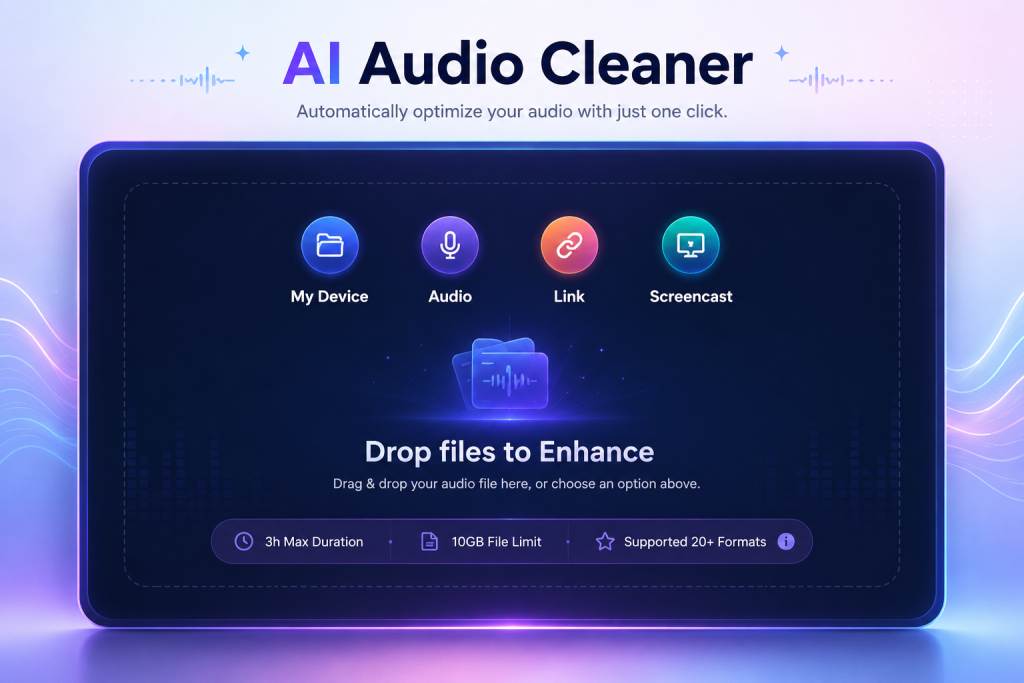
- Upload — Open the free echo remover and add your MP3, WAV, M4A, or supported video/audio file.
- Process — The AI detects echo and room reflections, then reduces.
- Preview and download — Compare before/after, then export echo-reduced audio ready for your editor, LMS, or podcast host.
For tracks that are both noisy and roomy, run echo removal first, then polish with the AI audio enhancer for leveling, clarity, and overall repair.
When to Use Echo Remover vs Reverb Remover
| Problem you hear | Best tool |
| Distinct repeat or “slap” after words | Echo remover |
| Long, smooth “hall” tail on voice | Reverb remover |
| Both echo and reverb | Echo first, then reverb; or test both lightly |
| Low volume, hiss, or dull tone after cleanup | AI audio enhancer |
How to Make Video Audio Less Echoey for YouTube, Courses, and Social
Video adds another layer: viewers forgive average picture more than muddy sound. If you are searching how to make video audio less echoey, start with capture, then fix the export.
On-Set Tips for Cleaner Video Sound
- Record dialogue in the smallest furnished room available.
- Use a lavalier or shotgun mic rather than the camera’s built-in mic when possible.
Fix Echoey Video Audio in Post Without DaVinci or Premiere Plugins
Extract or upload your video’s audio track to the echo remover. After processing, replace the audio in your editor or use the enhanced file directly if your workflow supports it. Many creators batch-clean remote guest clips this way before final cut — faster than manual de-echo for weekly upload schedules.
Podcast and Interview Workflows
Remote guests on laptop mics are the top source of room echo. Normalize guest audio through the same AI pipeline: reduce echo in audio, optionally de-reverb, then enhance. Consistent processing makes multi-speaker episodes sound like one studio, even when nobody shared a room.
Who Should Use a Free Online Echo Remover?
- Podcasters and interviewers cleaning remote guest tracks.
- YouTubers and course creators fixing room bounce in voiceovers.
- Business teams improving webinar and meeting recordings.
- Real estate and event pros reducing hall echo in walkthrough or venue clips.
- Musicians and streamers tightening room sound on spoken segments between takes.
If you regularly work across noise types, bookmark AudioCleaner AI as your hub rather than juggling one-off apps per problem.
Conclusion
Echo makes good content sound amateur — but you do not need a treated studio. AudioCleaner AI’s free echo remover gives you one-click cleanup, pairs with a reverb remover when tails linger, and finishes with an AI audio enhancer when you want broadcast-ready clarity. Whether you need to remove echo sound from a podcast, from a room, or make video audio less echoey before publish, treat the room first, then let AI handle what the walls already captured.
FAQ
What is the fastest way to remove echo sound from a recording?
Upload the file to AudioCleaner AI’s echo remover. It processes most clips in seconds without installing a DAW or learning de-echo plugins.
How do I reduce echo in audio without re-recording?
Use AI echo remover that separates reflections from the main voice. For heavy reverb tails, follow with the reverb remover; for overall polish, use the AI audio enhancer.
How to eliminate echo in a room for video shoots?
Choose smaller furnished rooms, dampen reflective surfaces behind the subject, and use an external mic. If echo remains in the export, clean the audio track with the free AI echo remover.
Is echo the same as reverb?
Not exactly. Echo is often heard as a distinct repeat; reverb is a dense room tail. AudioCleaner AI offers dedicated tools for each: echo remover and reverb remover.
Is AudioCleaner’s echo remover really free?
Yes — you can try the “remove echo from audio” page without installation. No credit card is required to get started.
What file formats does AudioCleaner AI support?
Common formats include MP3, WAV, M4A, and other popular audio types supported on the echo remover page.