- TL;DR
- How to Merge or Combine Songs: The Basic Join
- Different Ways to Merge Songs Together
- Quick Comparison: Merge, Mix, Remix, Mashup
- Why Choose AudioCleaner’s AI Mashup Maker When You Want More Than a Simple Merge
- Conclusion
- FAQ
- How to merge songs together?
- How do you combine songs together when you want them to sound like one track?
- How can I mix songs together online?
- Can I merge songs without audio editing experience?
- What’s the difference between a mashup and a remix?
- Can I use the AI Mashup Maker to simply combine two songs end‑to‑end?
- Is creating a mashup legal for personal use?
TL;DR
- Searching for how to merge songs together usually means you want to join audio files. But merging can mean different things. Sometimes it’s simply joining tracks end to end. Other times, people actually want to mix, remix, or even create a mashup.
- Before choosing a tool, ask yourself: Do you just want two songs to play back-to-back, or do you want them to sound like they were made for each other? The answer determines which approach you need.
- If it’s the latter, AudioCleaner AI’s AI Mashup Maker is built for exactly that. By automatically matching tempo and key, it turns separate tracks into seamless, studio-quality mashups in seconds.
How to Merge or Combine Songs: The Basic Join
When you ask “how to merge songs” or “how to combine two songs together”, the simplest answer is: place one track after another and export them as a single file. This is often called merging or combining. No musical matching is required — it’s just a sequence, maybe with a short crossfade to soften the transition.
This technique works perfectly when you need to:
- Turn a set of songs into one continuous background track.
- Append an intro or outro to a podcast episode.
- Stitch several voice memos into a single audio story.
Merging does not change the original tempo, key, or structure of the songs. It’s purely an arrangement operation. If that’s all you need, basic audio editors handle it well. However, merging alone cannot create the magical “they were made for each other” effect that defines a mashup.
But in real life, people often use the phrase “merge songs together” to describe very different goals.The technique you need depends on your specific use case. For example:
- Prepare seamless background music for a wedding entrance, company event, or dance performance. (Mix)
- Adapt songs for YouTube videos, TikTok clips, or Instagram Reels with a fresh style or shorter format. (Remix)
- Combine vocals from one song with the instrumental of another to create a unique social-worthy track. (Mashup)
So, how do you know which approach is right for you? Let’s break down what merging, mixing, remixing, and mashups actually mean, and when each one makes the most sense.
Different Ways to Merge Songs Together
When people search for “how to merge songs together,” they don’t always mean the same thing. You might want to simply join two tracks, create smoother transitions, give a song a new style, or blend two songs into something entirely new. The right approach depends on the result you’re after. Here’s how each method works.
How to Mix Songs Together: Smooth Transitions Between Tracks
To mix songs together, you typically overlap two tracks and adjust volume, EQ, and transitions so they sound balanced and natural.
How to mix songs:
- Import the tracks into an audio editor or DJ software.
- Adjust volume levels and transitions.
- Add a crossfade to avoid abrupt changes.
Use mixing when you want:
- A seamless DJ set where songs overlap.
- Voiceover and background music to sit well together.
- A podcast episode with multiple speakers and consistent loudness.
Mix is about coexistence. A mashup goes a step further — it’s about fusion.
How to Remix a Song: Change the Style Without a Second Song
To remix a song, producers take one original track and rebuild it by changing its style, rhythm, or instrumentation.
How to remix:
- Extract or obtain the original stems.
- Replace or modify musical elements.
- Rearrange the structure to create a new version.
Remix is about:
- Changing the style or energy of a song.
- Creating a club edit, an acoustic version, or a lo‑fi flip.
- Adding creative production effects to an existing vocal.
Unlike a mashup, remixing focuses on reinventing one song rather than combining two separate tracks. If you need to isolate vocals before remixing, tools like AudioCleaner AI’s Vocal Remover, can help simplify the process.
How to Create Mashup: The Creative Fusion of Two Songs
To create mashup, you combine elements from two different songs, such as the vocals from one track and the instrumental from another, into a new piece of music.
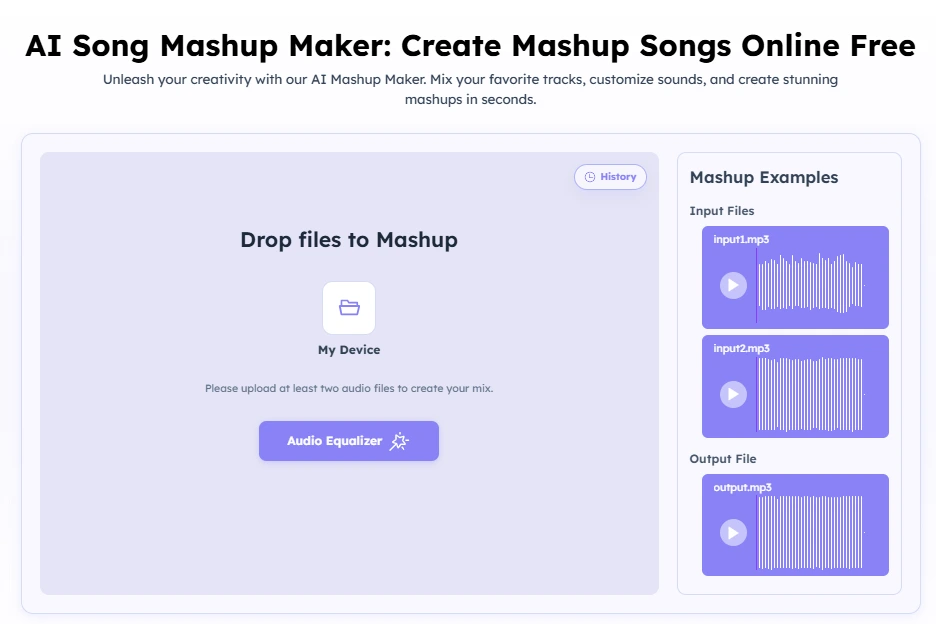
How to mashup songs with AI:
- Upload two songs — any genre, any tempo, any key. Drag them into the AI Mashup Maker.
- Let the AI sync — It analyzes and aligns both tracks in seconds.
- Preview and download — Get your ready‑to‑share mashup instantly.
Use mashups when you want:
- Create TikTok or YouTube content.
- Make party playlists more memorable.
- Discover unexpected combinations between favorite songs.
Try AudioCleaner’s AI Mashup Maker to generate a mashup in seconds without manual editing.
Quick Comparison: Merge, Mix, Remix, Mashup
To avoid confusion, here’s how the four techniques stack up. Notice that AudioCleaner’s AI Mashup Maker is designed exclusively for the last one — creating mashups.
| Technique | What It Does | Best For | Difficulty |
| Merge / Combine | Joins songs end to end | Weddings, podcasts, background playlists | Easy |
| Mix | Blends tracks smoothly together | DJ sets, dance performances, voice + music | Moderate |
| Remix | Reimagines one existing song | TikTok videos, lo-fi edits, creative versions | Advanced |
| Mashup | Combines elements from different songs to create something new | Mashup videos, social content, DJ performances, fan edits, viral creations | Advanced (Easy with AI) |
Why Choose AudioCleaner’s AI Mashup Maker When You Want More Than a Simple Merge
If your search for “how to combine songs” or “how do you combine songs together” really means you want to make something memorable — not just stick tracks in a row — the AI Mashup Maker is your best ally. It’s built for people who want more than a simple merge. It gives you the power to create a true mashup, which always sounds more intentional and impressive than a simple stitch.
Here’s what makes it special:
- Automatic tempo & key detection: No manual beat‑matching.
- One‑click blending: Upload two files, download your mashup.
- High‑quality output: MP3 with studio‑grade alignment.
- No software installs: Works in your browser.
Whether you want to surprise friends, create content for social media, or just hear what your favorite acapella sounds like over a completely different instrumental, this tool turns the idea into reality — without any of the traditional audio engineering hassle.
Conclusion
“How to merge songs together” can mean different things depending on the result you want. Sometimes a simple merge is enough. But if your goal is to make two songs sound like they were made for each other, what you really need is a mashup.
With AudioCleaner’s AI Mashup Maker, you can skip the complicated editing and create a polished mashup in just a few clicks.
FAQ
How to merge songs together?
Merging songs means placing them one after another to create a single audio file. You can do this with any basic audio editor. For a more creative blend that matches tempo and key, use a mashup tool like AudioCleaner’s AI Mashup Maker.
How do you combine songs together when you want them to sound like one track?
If you want two songs to blend as if they were made for each other, you need a mashup, not a simple combine. The AI Mashup Maker layers vocals from one song over the instrumental of another, automatically syncing everything.
How can I mix songs together online?
Traditional mixing tools are best for balancing overlapping tracks and adjusting levels. However, if your goal is to creatively combine two songs into something new, AudioCleaner’s AI Mashup Maker offers a faster and simpler alternative.
Can I merge songs without audio editing experience?
Yes. Basic merges can be done with simple audio editors, while tools like AudioCleaner’s AI Mashup Maker make it easy to create professional-sounding mashups without any technical skills.
What’s the difference between a mashup and a remix?
A mashup uses elements from two distinct songs. A remix starts from one song and alters it. AudioCleaner’s tool is specifically built for mashups — it needs two separate tracks to work its magic.
Can I use the AI Mashup Maker to simply combine two songs end‑to‑end?
The tool is optimized for creative mashups, not plain sequencing. For a basic end‑to‑end merge, a simple audio editor is a better fit. However, if you want the two songs to blend in a musically intelligent way, the AI Mashup Maker is exactly what you need.
Is creating a mashup legal for personal use?
In many regions, making a mashup for private enjoyment (personal playlists, gifts, private events) is generally acceptable. Distributing or monetizing mashups may require permission from copyright owners. Always check local laws and platform terms before sharing publicly.
Keep in mind that platforms like YouTube and TikTok have their own copyright systems, which may mute, restrict, demonetize, or remove mashup content that uses copyrighted music.